
It’s 9:40 pm. The kids are finally asleep, and you’re standing in the kitchen trying to remember what you were supposed to do before tomorrow: sign the field trip form? Order the birthday present? And did you remember to take your vitamins today?
Each one is small, and they all land on you while work, the kids, and the house compete for your attention. That’s the mental load.
I learned how to use AI to organize my life, and it helped me get most of that list out of my head. An AI assistant can turn a messy brain dump into a plan, build a week around your hours, line up the family schedule, and help with gift ideas. You can do all of that without optimizing every minute of your day. It frees up your brain and time for what matters to you.
Before generative AI was everywhere, I was a product manager on a concierge app. People asked it for a flight, a hotel, or a dinner table, and the AI behind it sorted the options, picked the best one, and booked it. Fast forward a few years: I became the default parent of two, and some weeks I couldn’t remember to send a form back on time. The prompts in this post are built the way that app was: they take a messy request and hand back one clear answer.
The first thing I handed to AI was meal planning because it took a chunk of every week, and I hated it. Now I use it for much more than dinner, and my biggest use is weekly and monthly planning. Most Sunday nights, AI helps me turn my calendar, to-do list, and everything I’ve been meaning to do into a plan for the week.
I use Claude because it lets me set things up once, so I don’t have to repeat myself. It works right in the files on my computer, saves instructions so my weekly planning runs the same way every time, and runs tasks on a schedule without me opening anything. It also connects to the tools I already used, so I didn’t have to learn anything new. ChatGPT and Gemini will work with every prompt in this post too. Start with the one you already have and stick with it for a while, so your saved prompts and past conversations stay together.
How To Use AI To Organize Your Life
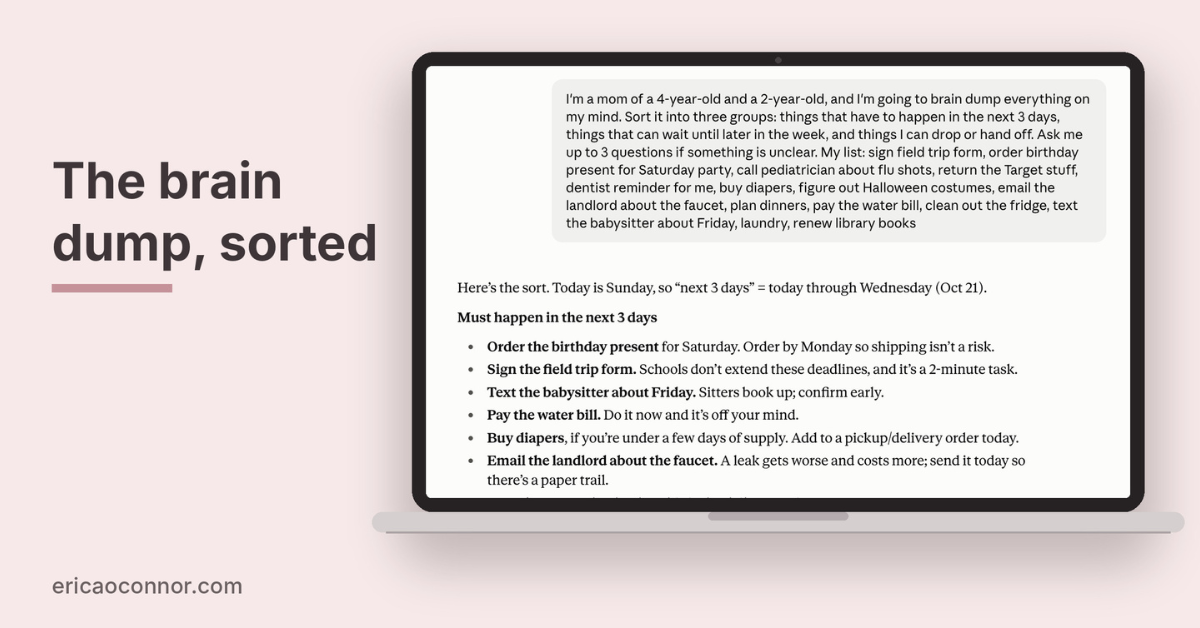
The easiest way to start using AI to organize your life is a brain dump. Type everything on your mind into one message to your AI assistant, then ask it to sort the list into a plan. Once you’ve seen AI sort one list, you can hand it the rest of your week: daily routines, the family schedule, meals and a grocery list, the house, and the stray ideas that don’t fit anywhere else. Each section below covers one of those areas with a prompt you can copy and paste.
Start with this brain dump prompt, typos and half sentences included:
- I’m a mom of [kids’ ages], and I’m going to brain dump everything on my mind. Sort it into three groups: things that have to happen in the next 3 days, things that can wait until later in the week, and things I can drop or hand off. Ask me up to 3 questions if something is unclear. My list: [paste everything]
Answer its questions, and if the groups look off, say so and ask it to try again.
How Can AI Help You Create Daily and Weekly Plans
A sorted list still leaves you deciding when each thing happens. AI can take your work hours, pickup times, and the nights you’re too tired to cook, and build a plan around them.
Turn a Brain Dump Into a To-Do List
Turning a brain dump into a to-do list means giving each item a next step, a rough time estimate, and a day it belongs to. Ask the AI to do that for you, and to flag anything that’s really a project hiding inside one line, like “plan the birthday party.” Review the AI-generated list before you act on it, and cross off anything that doesn’t belong.
- I’m a mom of [kids’ ages] with about [hours] for my own tasks this week. Turn this list into a to-do table with the next step, a time estimate, and the day each item should happen. If an item is a bigger project, break it into 3 to 5 steps. Then tell me the one thing to do first. List: [paste the sorted groups or your brain dump]
Build a Realistic Weekly Plan
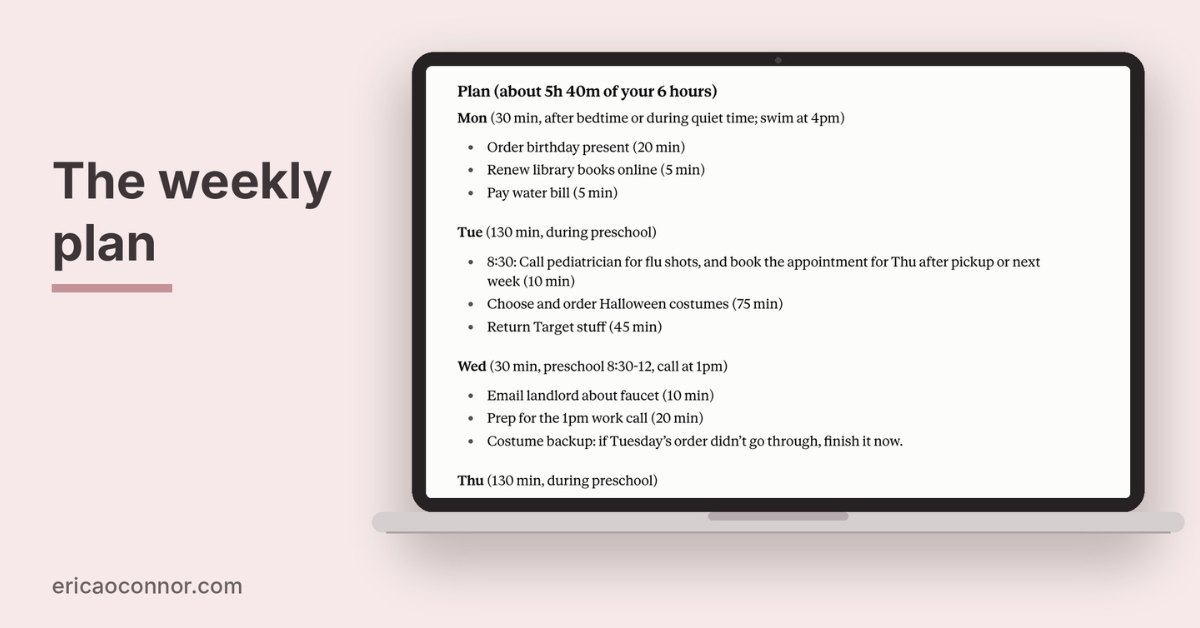
Next, fit that list into a week already full of work, family stuff, errands, and appointments, leaving time for you. My weekly planning prompt works from five things: my weekly calendar, my to-do list, what I didn’t finish last week, how many hours I have for my own tasks, and my top three priorities. Claude is connected to my calendar and task list, so it pulls in this information automatically. If yours isn’t connected, paste it in.
- I’m a mom of [kids’ ages] planning my week.
My calendar for this week: [paste it, with names and school names taken out].
My to-do list: [paste it].
What I didn’t get to last week: [list].
Time I have for my own tasks this week: [hours, and which days are tight].
My top priorities this week: [1 to 3].
Before we plan anything, give me feedback on this week: what’s too much, what’s missing, and what should move. Then ask me for a brain dump of anything else on my mind.
Output: a day-by-day plan, Monday through Sunday, with each task on a specific day and nothing scheduled past the time I said I have.
Make the call: if it doesn’t all fit, tell me what to drop or push to next week, and why.
Create Daily Routines for Mornings and Evenings
The weekly plan decides which day things happen. For the hours inside each day, tell the AI where your mornings and evenings tend to go wrong (shoes, lunches, the bedtime stall) and ask for a short routine that starts early enough to leave room for it.
- Build me a morning routine for a family with [number] kids, ages [ages]. We need to leave the house by [time]. The usual problem spots are [shoes, breakfast, getting dressed]. Give me a step-by-step list with times, starting from when the first person wakes up, and put the problem spots early enough that there’s a buffer. On a rough morning, tell me which step to skip.
For evenings, swap the leave time for a bedtime and list what needs to be ready for the next morning.
Set Up Recurring Tasks So You Stop Forgetting Them
Some tasks come up every few weeks or months, which is exactly why they slip: changing the furnace filter, refilling a prescription, renewing library books, paying the quarterly bill. Ask the AI to build you a recurring task list, then put those tasks into whatever reminder app or calendar you already use. If your AI connects to your calendar or reminder app, ask it to add them for you.
- I’m a mom of [kids’ ages] living in a [house or apartment]. Make me a list of recurring household tasks, grouped by how often they happen: weekly, monthly, every 3 months, and once a year. Include the things people commonly forget, like filters, batteries, and annual appointments. Star the ones that cause the biggest problems if you skip them.
Do a Sunday Weekly Reset With AI
I do my weekly planning in one sitting, usually on Sunday night. It takes about 20 minutes, and the brain dump takes the longest. I saved the instructions as a skill, so I don’t have to retype them.
Without that setup, one message gets you most of the way. Paste in what’s on the calendar, what didn’t get done, and anything new that came up.
- I’m a mom of [kids’ ages] with about [hours] for my own tasks next week.
On the calendar: [paste].
Didn’t get done last week: [list].
New things that came up: [list].
Give me the 3 things that matter most for the coming week, a short list of what can wait, and one thing I can drop entirely.
Save the prompt somewhere you’ll find it and run it on the same night each week.
Do a Monthly Reset With AI
Once a month, I do the same thing for the whole month. Claude pulls my goals, last month’s priorities, my calendar, and my tasks. We look back at how the month went, then use that to set up the next one. Each Sunday’s weekly plan works toward those monthly priorities, and I keep a record of every month in Notion. Some months a goal gets set aside, because you can’t prevent life from life-ing.
- I’m a mom of [kids’ ages] planning next month. My goals for this year: [list].
Last month’s priorities: [1 to 3].
What happened last month: [what got done, what didn’t, what came up].
Next month’s calendar: [paste it, with names and school names taken out].
Tasks still open: [paste].
First, help me look back at last month: what worked, what didn’t, and what should carry over. Then ask me what’s coming up next month that isn’t on the calendar yet.
Output: my top 3 priorities for next month, the dates to plan around, and a focus for each week.
Make the call: if my goals and my calendar don’t fit together, tell me which goal to set aside this month, and why.
These prompts plan the week and month. For the daily decisions, like dinners, mornings, and family logistics, I put together 10 more prompts in a free Notion template.
How Can AI Help Organize Your Family Schedule
Beyond your own week, the family schedule includes everyone else in your family life, and the default parent usually ends up tracking it all.
AI can do the typing and the cross-checking, so the goal is one calendar everyone can see, even if it’s never perfect.
Combine Everyone’s Commitments Into One Shared Calendar
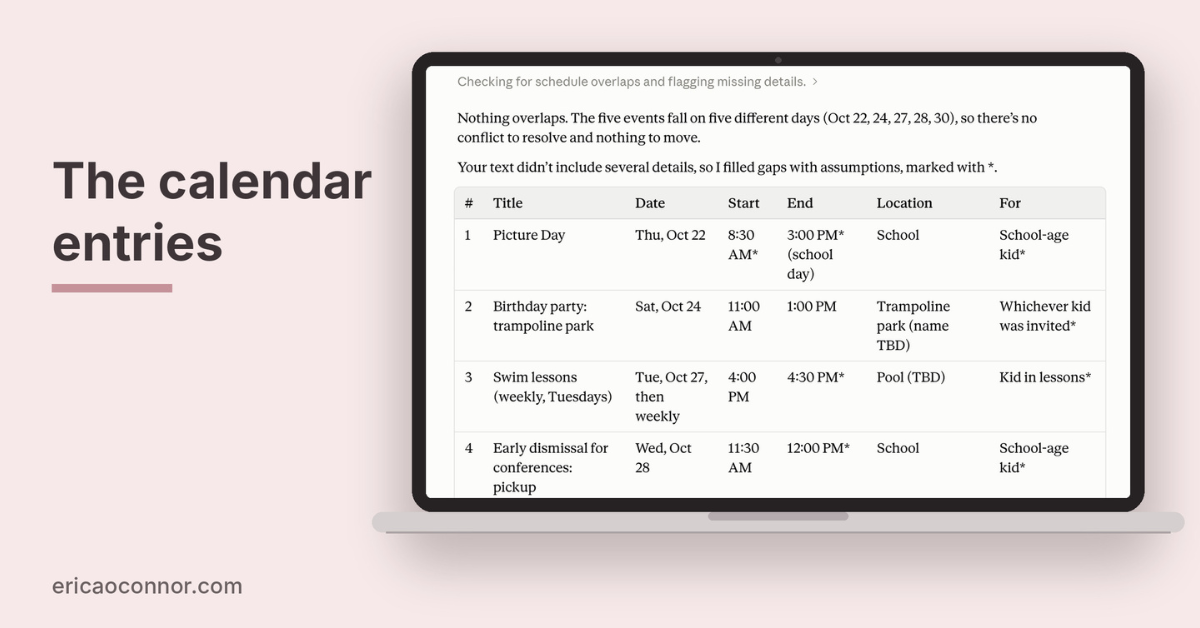
When our school calendar came as a PDF, I took a screenshot of it (which kept the school’s name out) and had AI turn it into Google Calendar events. Then I shared that calendar with my husband, so we both see the same dates. You can do this with dates from emails, flyers, sign-up sheets, or group texts. A shared calendar puts them in one place, and AI can do the typing.
- Dates and events from several places, with names and school names taken out: [paste emails, flyer text, texts]. Turn them into a list of calendar entries with a title, date, start time, end time, location, and which family member it’s for. Flag anything that overlaps, and for each conflict, recommend one to move.
Double-check every date before you share the calendar with family members.
Plan Around School, Daycare, and Kids’ Activities
School and daycare calendars include early dismissals, closures, conferences, and picture days, and kids’ activities add their own schedule on top. When I plan my month, I start with my capacity. Days the kids are home are my low-capacity days, so a week with a school holiday or early dismissals gets less on the plan.
Paste in the school calendar and the activity schedule, and ask the AI to find the days that need a plan. For the rest of the school paperwork, like forms and newsletters, start with my post on AI for moms.
- My kids’ school or daycare calendar for the semester, with the school name removed: [paste].
Their activity schedules: [paste].
My and my partner’s work hours: [paste].
List every day where we have a coverage gap, an early pickup, or a conflict, and suggest one way to handle each.
Create a Chore Chart for Family Members
Give the AI everyone’s age and schedule, and ask it to split chores so each person gets what they can realistically manage, including invisible tasks like restocking the diaper bag or noticing the soap is low.
For more chore prompts, my ChatGPT prompts for parents include a chore management section.
- Create a weekly chore chart for my family: [list family members, ages, and schedules]. Include daily and weekly chores, plus the invisible tasks that usually fall on one person (restocking, noticing what’s running low, planning). Make tasks age-appropriate and spread the load as evenly as possible. Format it as a table I can print, then tell me the one chore to hand off first.
Plan Errands and Carpools
A week of errands might include a shopping list for one store, a return at another, and a prescription pickup on the other side of town. Ask the AI to group them by location and day so one trip covers several stops. For carpools, give it everyone’s schedule and ask for a fair rotation.
- My errands for the coming week and where each one is: [list].
Group them into as few trips as possible, matched to the days I’m already out of the house: [list days and times].
Then help me write a carpool rotation for [activity] with these families: [first names and availability].
If everything won’t fit, tell me which errand to push to next week.
How Can AI Make Meal Planning and Grocery Shopping Easier
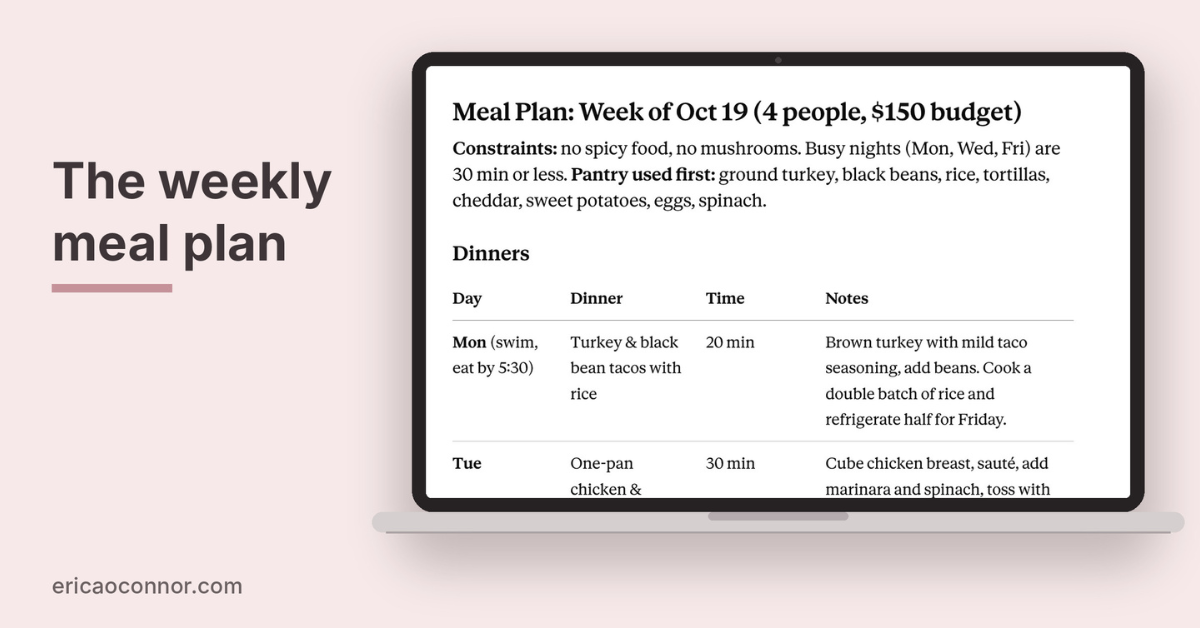
Give AI your weekly schedule, what your family will eat, what’s in the fridge, and your budget, and it can build a weekly meal plan and turn it into a grocery list sorted by store section. Planning around what’s already in your fridge also helps reduce waste, because you use the half bag of spinach before it goes bad. Try this prompt:
- Build a weekly meal plan for [number] people.
Our schedule: [busy nights, nights someone is home late].
We like [foods] and avoid [foods].
Already in the fridge and pantry: [list].
Our grocery budget is [amount].
Use what we have first, keep the busy nights to 30 minutes or less, and then give me a shopping list grouped by store section.
Tell me which dinner to save for our busiest night.
I have a full guide on how to use AI to meal plan if you want more details.
How Can AI Help Organize Your Home
Most home tasks come down to a list of steps. Tell the AI about your space and your week, and it can put those steps in order.
Create a Weekly Cleaning Schedule
A weekly cleaning schedule breaks the work into small pieces each day. Tell the AI how much time you have each day and which rooms get the most traffic.
- Create a weekly cleaning schedule for a [size] home with [number] bathrooms, [kids and pets]. I have about [minutes] on weekdays and [minutes] on weekends. Schedule more frequent cleaning for high-traffic rooms, give each day a short task list, and include one monthly deep-clean task each week so they rotate. Mark one task per day if I only get to one.
For a seasonal deep clean, these ChatGPT prompts for spring cleaning cover checklists and decluttering in more detail.
Plan a Decluttering Project Room by Room
For decluttering, ask the AI to break the house into rooms and short sessions, starting with the space that bugs you most.
- I want to declutter my home room by room. The rooms are [list]. The one that bothers me most is [room]. I can give this about [minutes] at a time, [number] times a week. Make me a plan that starts with that room, breaks each room into sessions that fit my time, and tells me what to do with donations so they leave the house the same week. After that room, tell me which one to do next.
Manage Home Projects Like a Project Manager
Bigger projects (a nursery, a garage, a kitchen refresh) go more smoothly with simple project management: a timeline, a to-do list, and a budget. When I wanted to paint, AI helped me pick the colors and figure out how to do the job.
- I’m planning this home project: [describe it]. My deadline is [date], and my budget is [amount]. Create a timeline with phases, a to-do list for each phase, and a budget breakdown by category. Flag the steps that depend on each other and the ones that usually take longer than people expect. Then tell me what order to do them in.
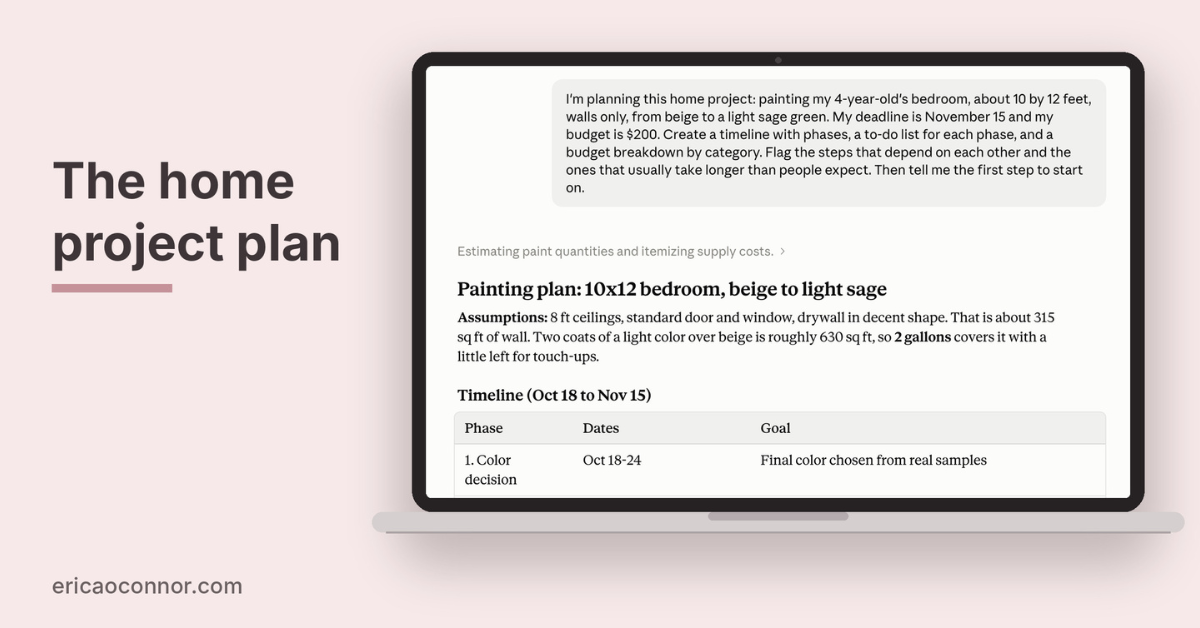
Come back to that conversation as the project moves along, so the AI has the full history.
How Can AI Help Clear Your Mental Clutter
Next to the big projects, most of the mental load is small stuff: the gift idea, the email you still need to answer, the reminder you keep meaning to send. AI is useful here as a place to put things down.
Keep a Running List of Ideas, Gift Ideas, and Notes
When something pops into my head, I either open my weekly planning chat and ask Claude to add it, or I put it straight into TickTick. On Sunday night, Claude helps me sort it all into the plan with everything else.
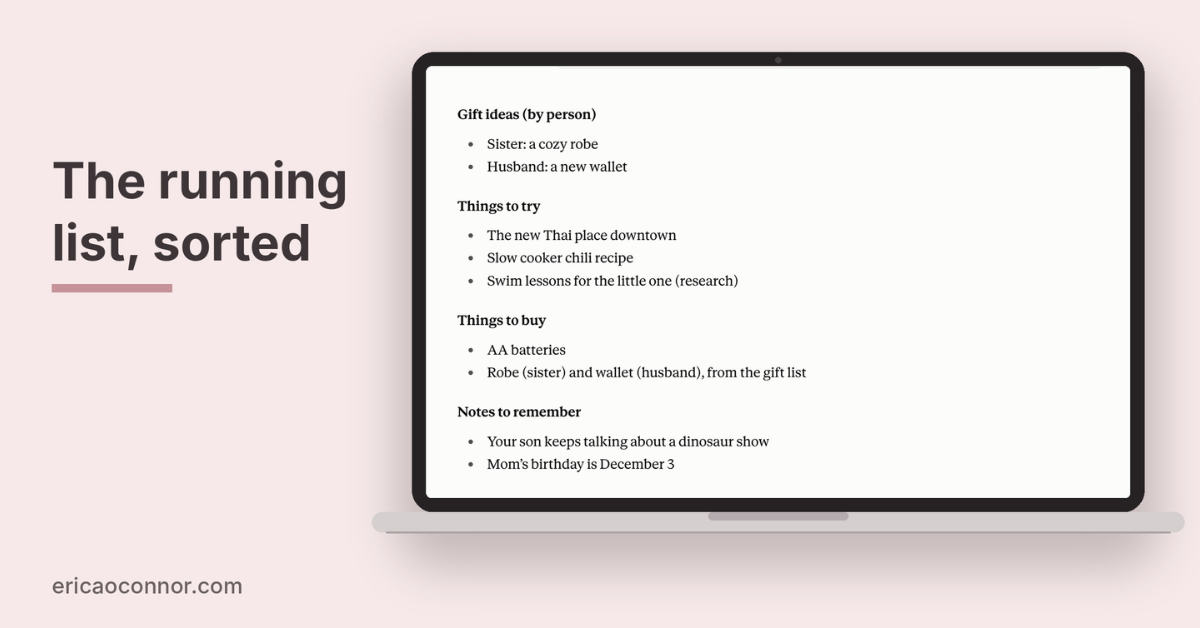
If you don’t have a setup like that, start one ongoing conversation or note and add to it whenever something occurs to you: a gift idea for your sister, a restaurant someone recommended, the show your kid keeps talking about. When it’s time to use the list, ask the AI to sort it.
- I keep a running list of ideas and notes. Everything I’ve added so far: [paste]. Sort it into categories (gift ideas by person, things to try, things to buy, notes to remember) and pull out anything that has a date attached. Then tell me which item to act on first.
Summarize Long Emails and School Newsletters
School and daycare newsletters tend to bury the one date you need under three paragraphs of updates. Paste the text in and ask for the action items. Most AI assistants will also take a photo or a PDF.
- Summarize this newsletter. List every date, deadline, and thing I need to do or send, in order of when it’s due, and skip everything else. Tell me the one thing to do today. [paste text or attach the file, with the school name removed]
Draft Messages and Reminders You Keep Putting Off
Most default parents have a short stack of unsent messages: the RSVP, the note to daycare about a pickup change, the reminder to the other parents about whose turn it is to bring snacks. AI can write the first draft for you to edit and send.
- Draft a short, friendly message to [person] about [topic]. I need to [ask for, remind them of, decline] [the thing]. Keep it under 4 sentences, warm but direct, and written for [text or email].
Tips for Using AI To Stay Organized
- Start with one area. Pick the part of your life that feels heaviest (meals, the family schedule, the house) and use AI there first. Add the next area once the first one is a habit.
- Save your best prompts. When a prompt works, keep it in a note (or save it as a skill) so you can reuse it. A saved prompt saves time every week because you only have to change the new details.
- Give it the specifics. The more you tell it about times, ages, budgets, and what usually goes wrong, the more useful the plan.
- Go back and forth. If the first answer misses, tell it what’s off and ask again. The second or third try is often the one you use.
- Double-check dates and details. AI can make mistakes, especially with dates, times, and anything it has to pull from a long document. Double-check anything important before finalizing.
- Keep sensitive information out. Don’t share account numbers, passwords, or your kids’ full names, birthdates, and school details. Use first names or initials, and describe instead of copying.
- Let the plan change. When the week falls apart, paste what happened and ask for a new plan for the days left.
The goal is a system that works in real life, including sick days and surprise early dismissals, even if it never looks perfect.

Your First Sunday Night Plan
The next time it’s 9:40 pm and your brain is still running on a loop, open your AI tool and paste in the brain dump prompt from earlier in this post. It’ll sort the field trip form and the birthday present into what has to happen in the next few days, and you can go to bed with them out of your head. Then on Sunday night, give the rest of that list to the weekly planning prompt and let it build your week.
Once your week is planned, think about what’s coming up next month. Inside The Simplified Membership™, I share new AI prompts and tips each month, plus the Ask Like a Mom™ prompt library with 100+ prompts built the same way as the ones in this post. Yes, I want that kind of support.
Pin one of these images to your AI board so you can come back anytime you need it.





Leave a Reply